Showing posts with label Silverlight. Show all posts

Monday, July 14, 2008

What I did on My Summer Vacation

So it's not so much did as still doing but here's just a little update on what I'm up to at the moment, it's quite a bit.

Moving

moving Many of you already know this but I am in the process of selling my house and moving out of Ohio.  It is with mixed feelings that I do this as I have really come to love the emerging sense of community in the Cleveland development arena and the help we've had in building it from the twitter tribe.  On the other hand I'm taking this opportunity to move to anywhere I want, anywhere at all. 

I've been searching for a specific type of company for the last several months and finally decided on one that I feel is a perfect for for me at the moment.  I'm not going to say who yet, I don't want to jinx it, but it's a great web firm out of Seattle and they are flying me out for an in-person interview in a week or two.  I've already had a couple phone conversations with them as well as did a "home work" coding assignment.  So far it would seem like they like what they see, I know I do.  This is a great chance to be a full time Silverlight developer, and I'm more than a little excited at the prospect.

As part of this process we're also selling our house.  If you've ever sold a house before you know how much work it is getting and keeping everything perfect.  It's not a great market to be selling a house but we're optimistic that we'll get an offer soon.  We hope so anyway.

Writing

campbell_cover150 The writing on Silverlight 2 in Action is still ongoing.  I now see how much effort goes into the writing of a book.  There is probably a hour of research and coding for every five minutes of actual writing.  We are waiting until the release candidate comes out to finalize everything but I still have a ton of work to do even before that.  It's all worth it though.

It is known among people that teach or present that committing to do one of those actions is a good way to learn a technology.  I would argue that writing a book is even better.  You have to ensure that you know the material good enough to stand up to the criticism of peers, and trust me, we can criticize quite well.

Speaking

microsoft_silverlight_c Remember a minute ago when I said that presenting is a good way to learn a new technology?  Well, watching a presentation can be a good introduction as well, so come watch me talk.  I'll be the speaker at the August 12th meeting of the Cleveland .NET SIG.

Here's my abstract for the talk: Now that most people know that Silverlight can do fancy animations and play videos, lets look at how to make it do some real work.  In this presentation we will demonstrate connecting to web services, using returned data, binding data to controls and discuss some limitations Silverlight currently has.  And of course, since it's Silverlight, we'll try to make it look good in the process.

Coding

stacked_small_slbc_08 Hopefully you have all heard about the Silverlight Control Builder Contest by now but if not, head over there and read up on it now.  Basically, you build a templateable custom control, submit it to the contest, and win prizes.  Well, you can try to win prizes anyway, a whole bunch of other people will be entering as well.  The prizes are getting better and better and include books, software, gift certificates and more.  Wait a second, the more people that enter the less my chances of winning.... Never mind, don't enter :).

How to Learn Silverlight

image001_low With a lot of people wanting to learn Silverlight today and not really knowing where to start, I thought I'd write something to help people get started.  This is not meant to be better than Jesse Liberty's version of the same thing, just a different take on it.

  1. Go read my post titled What Is Silverlight.  This should give you enough of an overview of Silverlight to make sure that it is what you think it is.
  2. Install the tools at http://silverlight.net/getstarted.  This will give you everything you need to begin building Silverlight applications.  Don't forget Expression Blend, even if you are not a designer some things are just a lot easier using Blend.
  3. Watch a couple "How Do I" videos on getting started and any other topics that interest you.
  4. Work through a QuickStart.  These expose you to programming numerous areas of Silverlight.  Feel free to just read the sections you need, when you need them.
  5. Build something.  It doesn't have to be original, fancy or even work well.  Don't even show it to anyone if it doesn't turn out looking quite right, but build something.  Pick an idea like a weather widget or an ad rotator or get adventurous and build a simple little space invaders style game, anything just BUILD something.  Using it is the best way to actually learn any technology.
  6. Don't be shy.  Use the forums at http://silverlight.net/forums whenever you run into a stumbling block.  I would encourage you to attempt a search of the forums first though since if you are having trouble with something, someone else probably has as well.
  7. Read a lot.  Everybody and their brother is blogging about Silverlight.  A simple Google search will turn up information on nearly anything you can think of.  A good place to start is to subscribe to the Community blog aggregation feed from Silverlight.net.  Also be sure to catch Silverlight Cream as Dave Campbell does a great job of aggregating all the Silverlight posts he can find into a nice, searchable site.
  8. Push yourself.  Commit to doing something that you don't know how to do yet but know is possible.  There are a lot of options in this arena:
    1. Build a prototype for a work project
    2. Give a Silverlight presentation to a local user group
    3. Write an in-depth technical blog post
    4. Enter a contest.  At the moment I know of the Control Builder contest, an article writing contest and INETA is supposed to be starting the Silverlight Challenge soon as well.

I know that everyone has their own individual style and pace of learning but hopefully this will point you towards the path of [Silver]enlightenment.

Friday, July 11, 2008

What Is Silverlight?

image002_low I've noticed lately that a lot of people seem to have misconceived notions of what exactly Silverlight is and does.  I will attempt to explain what Silverlight is and how it fits into the web spectrum in language that even your boss will understand.  What I won't do is try to tell you when you should or shouldn't use Silverlight or how to build specific applications using it, those are topics for other posts.

If you have built a little prototype app in Silverlight, and certainly if you have done more than that, this post is not for you.  This post is directed at those that have heard of Silverlight, think they might know what it is and would like to know if it fits their needs.  It is also a good post to read to get a good general understanding of the way web development works.

Terminology

IIS, Apache, etc.  These are web servers.  They accept the request from a client browser and return the appropriate response.

PHP, ASP.NET, PERL, JSP, Cold Fusion.  These are all server technologies.  They execute on the web server itself in response to requests from a client, typically a web browser.  They typically output HTML. 

MySQL, SQL Server.  These are the databases, they also are located on a server.  Typically the web server technology will have a method to connect to the database.

HTML, JavaScript, AJAX, Silverlight, Flash.  These are all client technologies.  They execute from the web browser itself.

SOAP, WCF, REST.  These are all types of web services.  Typically these are created on a web server to expose data and logic to outside applications.

XML, JSON.  These are data formats.

Where Silverlight Fits

As stated in the previous section, Silverlight executes in the client browser.  What does this mean? It means:

  • Silverlight applications need to be hosted on a web server
  • Silverlight does NOT need to be hosted in IIS, any web server will do
  • Silverlight does NOT need ASP.NET on the server
  • Silverlight applications cannot access databases without an intermediary (like a web service)
  • Silverlight applications cannot access server-side classes or variables without an intermediary (like a web service)

Silverlight also can run on any major browser (Internet Explorer, Firefox, Safari) on any major OS (XP SP2, Vista, OSX, Linux).

Programming Silverlight

Programming Silverlight applications can take many forms.  This is due to a number of items. 

First, the plugin contains a limited version of the .NET framework.  What this means is that you can write real, compiled and managed code that executes in the context of the client browser itself.  What it doesn't mean is that you have access to the full framework.  There are a lot of areas of the framework that are missing completely, like System.IO and others that are present but are missing features, like no ArrayList for instance.  It also doesn't mean that you can build reference an already existing class library from your Silverlight application.  You can still use class libraries but they must be compiled against the Silverlight version of the framework.

Silverlight also introduces what is known as the DLR, or Dynamic Language Runtime.  This allows you to write code in non-traditional .NET languages such as IronPython or IronRuby.

Silverlight Versions

The most current version of Silverlight that is in full release is Silverlight 1.  Silverlight 1 is very good at displaying Media (audio and video) but it's lack of controls and reliance on JavaScript as the only programming language, introduce numerous limitations.  For a first generation plugin though, it isn't bad at all.

Silverlight 2 is currently in it's second public beta and is due to be in full release this fall.  It also contains a full commercial "go live" license, which means that you are permitted to use it to build real production, money-making applications with the Beta version.  Silverlight 2 introduces the .NET framework to Silverlight along with the DLR and a rich control set.  The majority of applications being built today are using Silverlight 2.  With all of the advances in Silverlight 2 combined with the go-live license and the short timeframe until the full release, building anything in Silverlight 1 today seems wasteful to me.

Silverlight and WPF

Silverlight is a limited subset of WPF, both of which use XAML as their markup language.  This allows for several things, such as the shortening of the learning curve when moving from one to the other.  It also means that typically, if you develop an application using Silverlight, it can normally be ported to run as a WPF desktop application with minimal effort.  Moving the other direction however, from WPF to Silverlight, can be more troublesome due to the greatly increased .NET framework and control set in WPF.

Silverlight and ASP.NET

ASP.NET and Silverlight overlap in some of their capabilities, but Silverlight is not a straight replacement for ASP.NET.  Since code written for ASP.NET executes on the server it has access to the entire .NET framework, can use connection strings to access databases and can use any number of third-party or internally generated class libraries.

Even on the client, there are times when you may want to stick with ASP.NET over Silverlight.  If you have parts of your application that are nothing more than data-entry forms, the standard ASP.NET controls are very well suited to that kind of work.

Silverlight and Flash

Everyone has heard talk of Silverlight being Microsoft's "Flash Killer".  Personally, I do not think that is the intention or even goal of Microsoft when it comes to Silverlight.  I believe that they (MS) saw a way to add more interactive capabilities to web applications in a way that is friendly to .NET programmers.  I see the emerging RIA space as being plenty large enough for Flash/Flex, Silverlight and even a few others.  Yes, they both do many of the same things and yes, Flash may do some of them better currently.  But give Silverlight some time to mature and you will see much more feature parity between the two.

Silverlight and AJAX

Built into the Silverlight plugin and SDK are numerous features that perform the same functionality as that provided by AJAX, but with the need to write complex JavaScript.  Silverlight has very rich support for reading data of numerous types from web services to RSS feeds to static XML files.  It also has methods to facilitate the deserialization of XML or JSON into strongly types objects for simple manipulation and binding.

Finally

Hopefully this post has helped answer some of your questions as to what Silverlight is, what it isn't and where it fits into the web space.  If you have more questions or want to correct me on something I may have mistyped, please leave comments here or use the forums at http://silverlight.net.

Thursday, June 19, 2008

Silverlight 2 In Action - I'm Writing a Chapter!

So as you all know I've been posting a lot about Silverlight lately.  Well not recently as I've been a tad busy.  I've been quite lucky to get to work on Silverlight at my day job which has greatly increased my knowledge of it in a short time.  I've also been pretty active in sharing the knowledge I've gained with other developers through this blog, live presentations and the forums at silverlight.net. 

Apparently all that effort was noticed because a couple weeks ago Chad Campbell asked if I would be interested in writing a chapter for Silverlight 2 in Action.  Well, of course I jumped at the opportunity.  Oh, and he needed the chapter written in less than two weeks.

Having never written a book before I had no idea how much work it was.  I knew two weeks was aggressive but wow.  I've spent pretty much every waking moment since the evening of 6/9/08 either at my regular job or sitting at my laptop writing.  Who knew that writing could be so tiring?

The chapter I'm writing is Chapter 6 - Networking and Communication.  This means that I have to write a ton of code samples, make sure they all work and then boil them down to just the parts that are needed.  There is a lot to this chapter too.  I've been writing about things like duplex WCF services, transferring JSON data from REST services and, of course, clientaccesspolicy.xml, everyone's favorite file :).

With the chapter almost wrapped up I should be able to start writing informative blog posts again, I've got a couple ideas for posts that should be pretty helpful.

One last note, Manning Publications has a program called MEAP where you can get the rough draft of the book in PDF form before it is published.  That means you can actually go buy a real Silverlight 2 book today!  Don't worry, you will also get the PDF (or print version if you prefer) of the final book when it is published.  You can get to the MEAP version of the book here.

Well, I've got to get this chapter done before the editor hunts me down :).

Friday, June 6, 2008

Silverlight Installation on Intranet Hosted Applications

Silverlight_Logo_thumb A few months back Tim Heuer wrote up a great post on customizing the Silverlight installation experience.  I highly recommend reading his post and doing something similar in your own applications, it can really make the user experience better. 

What I'm going to discuss builds on what Tim already wrote so go read his post first if you haven't done so already.  Don't worry, I'll wait.

The Problem

Welcome back.  I was recently presented with a situation that isn't exactly common, but is not so unusual that no one else will experience it, in fact, some of you may be working on this right now.  The situation I was presented with is we are building an ASP.NET application that contains a Silverlight application and is installed at client locations via a installation CD.  At some of the installed locations, end user PCs that will use the application don't have access to the outside Internet.  So how do we install the Silverlight Plug-in if the browser can't access the Microsoft download site? 

Hopefully the corporate IT department will have already pushed the Silverlight plug-in to all PCs in the enterprise.  There was a nice white paper put together last year explaining different approaches for doing just that.  Unfortunately, we all know that many IT departments are slow (or reluctant) to install new software, which is why we have this issue.

Since the application is installed in numerous locations from a single installation CD, we don't know the environment it will be installed in, so any solution had to handle cases both with and without Internet access.  After attempting numerous approaches I came up with something that is so simple and elegant I felt a little stupid for not coming up with the answer hours earlier.

The Solution

The first step is to ad the latest version of the Silverlight Plug-in installation .exe in your web app.  You could just point your installation link to that exe and call it done but that's an easy way out.  It would be better to have the user install directly from the Microsoft site to ensure it is the latest version that gets installed.  So what we needed was a way to determine if the users browser can access the Microsoft download site and then install the runtime from there if available or from the intranet application's web server if MS is not reachable.  This is actually quite easy.

There are two parts to the solution:

Object Tag

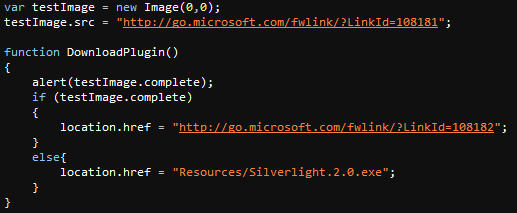
As Tim stated in his post, you can put quite a bit inside the object tag that hosts your Silverlight app that doesn't get rendered if the browser has Silverlight installed.  In this case I kept it very simple (basically the default object tag).  All I changed were the location the image gets loaded from and the destination of the link.  The image is now coming from the current application and the link points to a JavaScript function, which you will see next.ObjectTag

JavaScript

The JavaScript is also easy.  You will notice that the first two lines are not inside a function declaration, that means that they are executed as soon as the browser parses them during page load.  What those two lines are doing is attempting to load an image from the Microsoft.com download site.  Those of you with much web experience will notice that this is the technique we use to pre-load images for rollovers and similar effects.

The function then, which is called only if the user doesn't have Silverlight installed and clicks the "Install Silverlight" link, checks to see if the image was successfully downloaded or not.  If the image is present it means that the user does indeed have access to the Microsoft download site and directs the browser to the correct location and if not, directs them to the exe in the Intranet application.

JavaScript

Finally

As you can see this is a very simple way to make sure that users of Intranet hosted applications can still get the Silverlight plug-in, even if they don't have Internet access.  If anyone else has similar tips please pass them along.

kick it on DotNetKicks.com

Tuesday, April 29, 2008

Silverlight 2 TextBlock Responds to Mouse Events when Truncated

ANOTHER UPDATE: I received confirmation from Joe Stegman that yes, this is indeed a bug in Silverlight 2 Beta 1 but has been fixed in the forthcoming Beta 2.

UPDATE: This behavior can be fixed by adding a clip to the bounding control which in this case is a Rectangle.

I finally had time to sit down and really debug the Silverlight animation problem I described in a previous post.  I recommend heading over there and reading that post, it also displays the problem in action.

The issue is that when using the Height or MaxHeight properties to restrict a TextBlock, if the text is longer than is allowed by the defined size, even though visually the text is truncated, the area in which the text would be still responds to mouse actions.  It does not matter if the properties are set on a parent object like a StackPanel or on the TextBlock itself, the issue is the same.

Unless I'm missing something if the text is visually truncated, the non-visible area should not respond to mouse events.  If anyone knows of a reason for this or a way to fix it, please let me know.

Below is a sample app demonstrating the problem.  To see the grid working normally, move the mouse around and watch the squares change color.  What should happen is that the square that the mouse is in turns red, and when the mouse leaves the square goes back to green.  If you click an item so that the text changes, then the mouseover action changes.  Now the area about two and a half squares below the selected one will also turn the square red instead of the square that the mouse is over.  If you click the square again to set it back to normal, it acts as it should.

You can download the code for the example from here.

Friday, April 25, 2008

Silverlight 2 Beta 1 Problem with Animations on User Controls

YET ANOTHER UPDATE: I received confirmation from Joe Stegman that yes, this is indeed a bug in Silverlight 2 Beta 1 but has been fixed in the forthcoming Beta 2.

ANOTHER UPDATE: I found what is causing this, you can read about the exact cause and download sample code in a newer post.  If this is a bug in Silverlight or if there is a nuance with the TextBlock of which I'm not aware has yet to be determined.

UPDATE: This is most likely NOT a bug in Silverlight itself but probably has something to do with how I am implementing it.  I will post a detailed description of what caused it and how to avoid it as soon as the cause is identified.

Let me start by saying that this issue is one that I doubt will be seen by many people, even if it does persist into the RTM version.  Even describing this issue without using lots of pictures (or better yet a (mal)functioning sample) is not an easy task, so let me see how well I do.

Background

As I said in a previous post, I started a CodePlex project to build a session scheduler in Silverlight.  Within this application there is a User Control defined that represents a single session which includes the information about the session, the graphical representation of that data and an animation.  When the app reads in data from an XML file it creates a number of instances of this user control in specific locations in a Grid.

Matt Casto joined the project this week and the first thing he did was to create a more elegant way to catch the MouseEnter, MouseLeave and MouseLeftButtonDown events by adding them to the user control declaration tag instead of to the transparent rectangle that I had been using previously.  This made for a nicer experience as the area that handled the events would expand with the control during the animation.

Issue

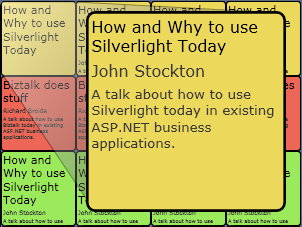
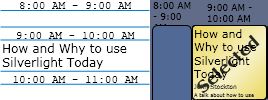
From the picture above you can see what the animation looks like in it's final (open) state.  When in this state, there is a path that overlaps a section of another instance of the user control below the currently active one.  With the new behavior if you move the mouse into this path covered area of the active user control, nothing happens since the mouse is still within the defined area of the user control.  So far this is all good.

The problem arises when you have one instance of the user control in an open state, then move the mouse into the area of another instance of the user control that would be covered by the expanded path.  The area I'm talking about is the top/left part of the small version of the control. 

The result is that if ANY animation is in it's open state, the instance of the User Control that would be covering that section is activated, not the instance of the control that the mouse is actually over.

Finally

I've reported this issue to Joe Stegman and may also post it to the forums at silverlight.net.  If I hear from Joe or someone else that it's actually a problem with our code and not a real Silverlight 2 bug, I'll gladly update this post with that information.

This one is most likely a rare issue that will not effect the vast majority of Silverlight applications, but it does appear to be a real issue.  For our application we decided that we can live with the odd behavior but for a business application that would be a hard case to make.

Sunday, April 13, 2008

Silverlight Session Scheduler at CodePlex

Guitar2 As many of you know, I am one of a group of local developers that is organizing Cleveland Day of .NET, a free one-day developer conference on May 17th.  As part of this we wanted a cool way to allow for registrants to select the sessions they want to see from the conference website.  Naturally when the words "cool" and "web" are in the same sentence, Silverlight comes to mind.  So I built one.

Description

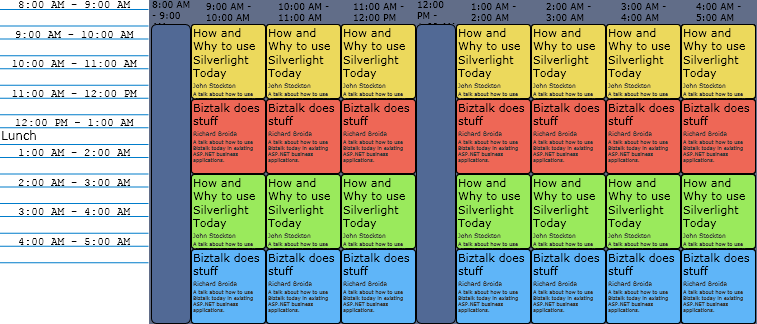
What I came up with is a simple way to view and select sessions for a one-day conference.  I hope to expand it to multi-day capable eventually.  It marks your selections and also shows them in a list to the side.  Eventually I would like to make it easy to print and submit your selections back to the server.  None of that is in it yet but still, I think it is kinda cool.

scheduleshot

The above image is just a screenshot.  The actual one does some neat stuff though, like an animation on mouseover to display more information.

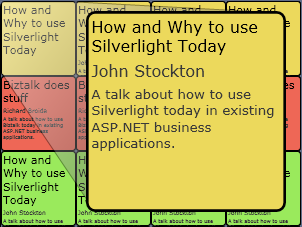
expanded

And when you select an item, two things happen: 1) an overlay with "Selected" is placed on the box and; 2) The title is added to the proper place in your schedule list.

selected

Open Source

In the true nature of Cleveland Day of .NET, I've posted the entire source for this app at CodePlex under the name Conference Session Scheduler.  Feel free to join and help me add more features or fix what's there.  You can also just download the code and use it as is if you want to, the choice is yours.  This is a good project to learn about User Controls, global variables (i.e. singleton object) and loading objects based on XML data. 

I'll pass along one tiny piece of code in this post:  How to set a Fill color from a string color value in code.

this.myRectangle.Fill.SetValue(SolidColorBrush.ColorProperty, "#FF386E1B");


I know the above looks simple but believe me, finding it was anything but easy.


Sample


If you have the Silverlight 2 Beta 1 plugin installed you should be able to see the scheduler in action.  I won't promise to keep this up to date as we update the code but at least it is as of 4/13.

Ok, so this is already out of date but I promise I'll replace the one in this blog with the real Cleveland Day of .NET schedule when it is posted next weekend.


  kick it on DotNetKicks.com

Friday, April 11, 2008

Silverlight 2: Custom Controls vs. User Controls

Silverlight_Logo_thumb In my first post on Silverlight 2 I concentrated on how to use User Controls in a Silverlight application.  Since I started writing this post, Scott Guthrie and numerous other developers have also written posts on User Controls.  One thing neither of them cover though is when to use them.  With most technologies there are numerous way to accomplish many tasks, Silverlight is certainly no exception and one example of this comes in the form of User Control vs. Custom Control. 

This post is different than my other Silverlight posts as I'm not showing any code and don't have a cool example to talk about.  This post is meant to be more of a discussion on the differences between User Controls and Custom Controls as well as some guidance on when to use one over the other.  Much of what I'm writing here is just opinion though so if you have a different though or if you find something that I have completely wrong please comment.

Definition

First off let me say that I haven't used Custom Controls much yet so that may sway me a little but I'll try and be open minded.  I'll also say though that it does appear that creating a custom control in Silverlight 2 is significantly easier than creating a custom control in ASP.NET.  Much Easier.

Custom Controls and User Controls both accomplish many of the same goals although in different ways.  It seems to me that this question is nearly the same in Silverlight as it is in ASP.NET, and I suspect with much the same answer.

User Controls

The Silverlight documentation gives two reasons for creating a User Control:

  1. To separate functionality into smaller, manageable pieces of logic that can be created independently from an application and other controls.
  2. To group related controls that can be used more than once in an application.

In practice, user controls are used extensively for both of the reason listed.  One of the great things about them in the ASP.NET world, and now in also in the Silverlight domain, is the ease with which they can be created and reused.

Custom Controls

Custom controls can be loosely defined as creating a control that is based on (i.e. derived from) an existing control and extends its functionality in some way.  Some reason they may be built are to add a capability not included in the base controls, make a company specific version of a control or to group several controls together to perform a specific function.  This last version, grouping several controls to perform a specific function, where the big overlap with User Controls occurs.

One other advantage of custom controls is that since they are compiled into a .dll, they can be reused in multiple Silverlight applications where a User Control is limited to the application in which it is created.

Scenario

While I was working on a new Silverlight 2 project a few weeks ago I had this scenario:

I want multiple blocks to have the same base behavior, such as being resizable, moveable and a similar look/feel.  However, I wanted the contents of these blocks to be different.

With the custom control vs. user control question I went to what is becoming an incredible resource when you are looking for advice but not big text references: twitter.  I happened to know that at least three recognized Silverlight experts (TheADOGuy, LBugnion and WynApse) were on twitter at that moment and that they were following me so I sent a question which resulted in the following conversation (minor editing for clarity):

johnnystock SL2 gurus: If I want to make a custom container object to handle things like drag/drop, look/feel etc. should it be user or custom control?

LBugnion @johnnystock Does your container have an intrisic look&feel, or is it going to change its look often?

TheADOGuy @johnnystock I suggest you derive a custom control from "Panel" but not knowing all your req's that might not be perfect

johnnystock @LBugnion Look/feel will be same for all instances

johnnystock @TheADOGuy Is there a SL2 panel? I was thinking of deriving from Canvas

LBugnion @johnnystock I use UserControls when the look&feel of my control is more or less similar (changes can be handled by styles)

LBugnion @johnnystock and CustomControl for truly lookless controls, where L&F changes a lot depending where they're used

LBugnion @johnnystock That said, the sugestion to make a custom Panel sounds pretty good!

johnnystock @LBugnion That's what I like to hear as personally I find User Controls easier than custom controls :)

LBugnion @johnnystock If you check MIX sessions, Robbie Ingebretsen shows how to create a custom WrapPanel. A good start for what you do

LBugnion @johnnystock Custom Controls are harder to understand, but flexibler to use.

johnnystock @LBugnion cool, thanks for the tips and I'll check tat session out

LBugnion @johnnystock but I do a lot with UserControls too.

TheADOGuy @johnnystock Yes, its the abstract class under all the containers...look at the class def of Canvas in the .chm...

LBugnion @johnnystock The session is Nerd + Art, around 00:46:00

From the above discussion it doesn't really look like there is always a clear cut line on when one type of control is better than the other.  Well, I think there are cases where custom controls are clearly correct, and cases where user controls are clearly right, but there is also a quite large overlapping gray area.  The gray area is seems mostly populated by container controls as well.  It seems like developer preference definitely plays a major part in the decision when in the gray area. 

For what I'm trying to accomplish I will probably be using both.  The functionality will be broken into user controls but the container that houses that user control will be a custom control.  In fact, the only reason I'll be using user controls at all is to reduce clutter and make multi-person development easier as the functionality will not likely be reused.  In my opinion those are valid reasons to use a user control, even though they are not the stated purpose of them.

Conclusion

I am by no means an expert on custom controls but I do have a lot of experience with User Controls and for me I don't know that there is a simple line to choose between here.  Personally I use something like this to help make the decision:

  1. Will this control be used in multiple applications? - probably Custom Control
  2. Is there a base class that has the majority of the functionality needed? - probably Custom Control
  3. Is rapid development a factor? - probably User Control
  4. Am I building it or just specing it out? - probably User Control if I'm building
  5. What am I more comfortable coding myself? - User Controls

Does anyone else have any criteria they use?  I'd love to hear feedback on your preferences as well.


UPDATE: Laurent Bugnion has posted a nice article explaining how to bundle a Silverlight User Control in an assembly to use across applications.

Digg!   kick it on DotNetKicks.com

Wednesday, April 2, 2008

Silverlight 2: Simple Animation

I'm not a designer.  Would have trouble even opening a professional design or animation tool.  But even I can make animations in Silverlight using Expression Blend.

Now, I didn't build anything big or fancy, but I think it's kinda cool.  Most of all, I did it all myself with no help from designers or even the web or help files.  I did 99% of it within the Expression Blend 2.5 environment, only had to go to Visual Studio 2008 to wire up an event handler, and that was only a one liner.

So, who is ? Click his name to find out. (If you see the download Silverlight logo or a blue bar instead you need to do that first).  Then click the name.

Did you click it?  Go ahead, do it, I'll wait.

So it's not big and fancy but it does show a neat effect you can use Silverlight for.  It's also a great example of using Silverlight for a very small piece of a page as opposed to the full RIAs that are being showcased.  I uploaded this tiny app to Silverlight Streaming to allow me to use it in this blog where I don't have access to the server or even the header of the page.  As you can see it works :).

How did I do it

I only had to touch two files for this little app, page.xaml and page.xaml.cs.  I did cheat a little bit by using a mono-spaced font to make the letter positions line up at the same location regardless of the letter width.  If your not sure what I mean take a look at these sets of letters in two different fonts:

iiiii
wwwww
iiiii
wwwww

Can you see how in the second font the letters are all the same width where in the first there is a very noticeable difference?  By using the mono-spaced font I was able avoid spacing issues.  Did I need to, no, but it made it easier.

Create the objects

Using Expression Blend 2.5 I created a Silverlight 2 Application that gave me the basic page.xaml and app.xaml files.  I then got right at creating the xaml objects.  First I replaced the default Grid root control with a Canvas instead.  I may not have needed to do this but since I was dynamically placing them and not using columns or rows, it seemed appropriate.  Next I added a rectangle to fill the background.

Xaml_canvas 

Again, I could have completely skipped this step and had a transparent background, but I know it was going to be on a white page so it made sense.  I then added a separate TextBlock for each letter each of which with the exact same height, width and vertical placement.  They were all exactly the same distance apart as well.

Xaml_Textblock

I then added a rectangle over top it all to act as the clickable area.

xaml

Build the animation

BlendInteractionWith all of the xaml objects created, I could start on the animation.  Again using nothing but Expression Blend, I first created the storyboard.  Then I selected the first letter (TextBlock) and added a keyframe at 0 seconds and another at 1 second.  I then selected the letter and drug it to it's new location.  Using split view when editing animations helps so you can fine tune values.  This made getting the letter to the exact spot I wanted quite easy.  To make the letters flow a little nice I added a couple more keyframes immediately after the first and before the last.  On to these I set the opacity of the textblock to be 65% and on the first and last keyframe I set made sure it was at 100%.  Running it a few times I was satisfied with the look so I then followed the same process for each of the other letters.

One thing that happened during this I found odd:  Even though I followed the same process for animating each TextBlock, the first half of them modified the Canvas.Left property while the others applied a RenderTransform along the X axis.  Both approaches bought about the same result but I still would have changed them to all be the same in a production application.

Wire the event

The only thing left was I needed a way to start the animation.  For this I selected the final rectangle and in the properties tab I selected the events pane.  Once there all I needed to do was double-click in the MouseLeftButtonDown text box and Visual Studio 2008 opened with the page.xaml.cs file open and the stub method already created.  Then it is as simple as calling the Begin method on the storyboard.

VS_mouse

I did do one other thing in code actually and that was in the constructor for Page, I set a couple of properties on the storyboard to get the reversing behavior and the pause between directions.

VS_Prop 
That's all there is too it.

kick it on DotNetKicks.com

Thursday, March 20, 2008

Silverlight 2: User Controls and Other Tips

Silverlight logo So I've started working in Silverlight and am completely blown away by it's power and ease of programming.  I'm not saying that there isn't a learning curve, there is with any new technology, but this one isn't too bad.  To be honest the hardest part of Silverlight 2 is finding information on it.  So with that said I'm going to pass on some of what I've learned over the last couple weeks.

First, the absolute best resource online currently is the forums over at Silverlight.net, there are people on there that really know their stuff and are happy to help out others.  You do need to register to use the forums but the same login/password you use at www.asp.net will work here as well.  I also recommend subscribing to the RSS feed of the latest blogs related to Silverlight, tons of good, knowledgeable people get cross-listed there.

So what am I working on?  First, this is what the project sponsors asked for:

rawbayface

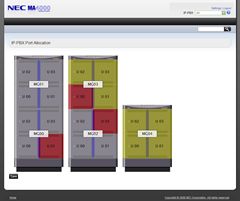
As you can see it's boring.  No one cares about look in this application but still, we saw that and immediately thought of a nicer way of doing it.  So we convinced my manager to allow me to build a prototype screen for the feature using Silverlight 2.  He even gave the approval before the beta for Silverlight 2 was released.  So this is what I built: (Disclaimer:  If anyone is an NEC Unified Solutions customer the following screenshot is not in and may never be in a released product)
SilverBayface

Look a little nicer eh?  Basically it reads an XML document at runtime that it downloads from an ASP.NET application and then parses that data to create a series of controls.  The controls are one to four Stacks which can contain one or two Modules, each of which contain four Units.  The Stacks, Modules and Units are all specific to the application being built, which happens to be a piece of a PBX management application.  These are represented in the Silverlight application using custom User Controls defined for each piece.  The host application will have business objects that also relate to each of these Silverlight User Control classes.  Each of these user controls (Stack, Module and Unit) are added at runtime based on the downloaded XML document.  There are also more controls at a lower level and a couple of controls that are nothing but forms but for now lets concentrate on those three controls.

I'm not an expert by far, yet, but I have learned quite a bit about them and am very impressed.  In many ways User Controls in Silverlight are much more powerful than their ASP.NET counterparts.  You don't need to worry about state between actions for instance, this one piece took me a little while to figure out but once I did it is powerful indeed.  So here goes, some tips and pointers on Silverlight 2 User Controls.

First there are a couple of things you need to know for the code to make sense, LINQ and the way we're accessing global resources.

LINQ to XML

The normal XML namespace is not available in Silverlight so if you want to work with XML, you need to learn LINQ.  For me this was probably the hardest part of creating the prototype.  I've created and consumed many a XmlDocument in the past so moving to XDocument instead was a big step, it all looks foreign to me.  I struggled through it though and made it work, though I doubt someone that really knows LINQ to XML would think this code is "pretty".

You will be seeing LINQ to XML used in a few of the below samples but here is a taste:

rawlinq

In the above sample I am parsing the XML displayed below and returning a collection of slot elements.  It's different but makes a lot of sense one you get the hang of it.slotxml 

Accessing Global Resources

Another issue that needed addressed is that of accessing global resources.  This is one area where I had to go to the Silverlight.net forums for help.  I'm not sure if the answer I received and thus the approach that I took is the recommended approach, but it does work.  Basically the approach is to take create a singleton class that is loaded during initialization and then can be accessed ad modified from any level.

rawglobal

You will see this object used in some of the later code samples, at least now you will know what you are seeing.  It is all very simple, as is everything in Silverlight, once you figure out how to do it.

Now to the User Controls. 

User Controls are Real Objects

This is something that on the surface sounds like a no-brainer but when you really understand what it means is one of those things that changes the game.  For those of us coming from the web world pretty much all we have ever known is stateless programming.  All of our objects are one-time use and then you load it again if you need it again.  ASP.NET tried to mask this somewhat but the basic fact still remained.

With Silverlight 2 though any properties that you assigned values to still have those values when you next look at that object.  That sentence is a little hard to follow so let me try to explain. 

  1. Add custom properties to your new User Control when you create it.
  2. At runtime assign values to those properties.
  3. When responding to events at a later time those properties still have the value that was assigned.

The above doesn't sound that big but when you have multiple instances of the user control and each instance has unique values assigned to it's properties, the usefulness becomes much more apparent. 

To illustrate this here is a custom User Control I created for the prototype.  This is one of the simplest user controls but it illustrates the points.unitxaml

As you can see it has a very simple presentation, nothing but a square with some text on it, both of which call the same click event handler.  Now for the (truncated) code behind for that same control:rawunitcode

The class is derived from UserControl and defines a number of properties.  It also has a second constructor which initializes those same properties.  Nothing unusual here.  Here is an event handler accessing the properties declared above:rawunitevent
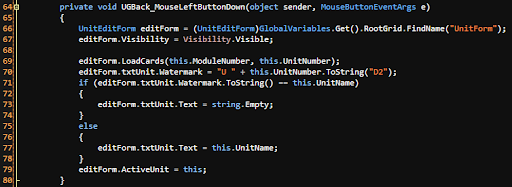
In this sample you can see that we are using the GlobalVariables singleton to obtain a reference to the root element of the XAML.  We then are using some of the values from the active instance of the Unit class to initialize an editable form, even passing in a reference to itself.

Programmatically Adding User Controls

For many dynamic applications you will not know at design-time the exact number of a given piece of your application.  This creates the need to add a given number of said element at run-time.  Enter Programmatically added user controls.

Adding a user control from code is quite simple and very similar to doing the same operation in ASP.NET.  You basically add the new user control to the children collection of some parent object.rawpage

After seeing how the controls are added, the code above of the event handler accessing the assigned properties should make a lot more sense.  You don't have to do any special coding to determine which object was clicked, as it is the actual object you created earlier.  This is a wonderful thing for all of us ASP.NET developers used to loading objects on each postback.

In a real world deployment there may be more logic happening here but this is all it takes to do this.  As you can see it is as simple as creating an instance of the control and then adding it to the parent.  One thing you may have noticed is the use of LINQ to XML, there is a reason for that that I will cover next.

Other Tips

  • Don't put a name on the root level control in your User Control or there can be only a single instance of it in the Silverlight application.
  • Learn LINQ.  I know I already mentioned this one but if you are going to be doing much Silverlight development it is a good thing to know.
  • Use Generic collections.  The Silverlight version of the CLR does not support the "old" collection types like ArrayList so get used to working with the new Generic collections like List<>.  Personally I prefer these anyway.

Final Thoughts:

So this was my first real taste of Silverlight development and all I can say is "WOW".  I already thought that this was going to be a game changer and now I am completely convinced.

This post has become a little longer than I had intended but I feel it is all good information for the ASP.NET developer getting started in Silverlight.  I will be posting more on Silverlight, and I'll also be giving some talks on it that will be announced in the near future.  This is an exciting time to be a web developer!

If you would like more information on this please comment on this post or ask me by another means.  I'll also be giving a presentation on April 22nd for the Cleveland C#/VB.NET Special Interest Group and again on May 17th at Cleveland Day of .NET with this same application as the base for the demos.


kick it on DotNetKicks.com