Showing posts with label Web Development. Show all posts

Friday, July 11, 2008

What Is Silverlight?

image002_low I've noticed lately that a lot of people seem to have misconceived notions of what exactly Silverlight is and does.  I will attempt to explain what Silverlight is and how it fits into the web spectrum in language that even your boss will understand.  What I won't do is try to tell you when you should or shouldn't use Silverlight or how to build specific applications using it, those are topics for other posts.

If you have built a little prototype app in Silverlight, and certainly if you have done more than that, this post is not for you.  This post is directed at those that have heard of Silverlight, think they might know what it is and would like to know if it fits their needs.  It is also a good post to read to get a good general understanding of the way web development works.

Terminology

IIS, Apache, etc.  These are web servers.  They accept the request from a client browser and return the appropriate response.

PHP, ASP.NET, PERL, JSP, Cold Fusion.  These are all server technologies.  They execute on the web server itself in response to requests from a client, typically a web browser.  They typically output HTML. 

MySQL, SQL Server.  These are the databases, they also are located on a server.  Typically the web server technology will have a method to connect to the database.

HTML, JavaScript, AJAX, Silverlight, Flash.  These are all client technologies.  They execute from the web browser itself.

SOAP, WCF, REST.  These are all types of web services.  Typically these are created on a web server to expose data and logic to outside applications.

XML, JSON.  These are data formats.

Where Silverlight Fits

As stated in the previous section, Silverlight executes in the client browser.  What does this mean? It means:

  • Silverlight applications need to be hosted on a web server
  • Silverlight does NOT need to be hosted in IIS, any web server will do
  • Silverlight does NOT need ASP.NET on the server
  • Silverlight applications cannot access databases without an intermediary (like a web service)
  • Silverlight applications cannot access server-side classes or variables without an intermediary (like a web service)

Silverlight also can run on any major browser (Internet Explorer, Firefox, Safari) on any major OS (XP SP2, Vista, OSX, Linux).

Programming Silverlight

Programming Silverlight applications can take many forms.  This is due to a number of items. 

First, the plugin contains a limited version of the .NET framework.  What this means is that you can write real, compiled and managed code that executes in the context of the client browser itself.  What it doesn't mean is that you have access to the full framework.  There are a lot of areas of the framework that are missing completely, like System.IO and others that are present but are missing features, like no ArrayList for instance.  It also doesn't mean that you can build reference an already existing class library from your Silverlight application.  You can still use class libraries but they must be compiled against the Silverlight version of the framework.

Silverlight also introduces what is known as the DLR, or Dynamic Language Runtime.  This allows you to write code in non-traditional .NET languages such as IronPython or IronRuby.

Silverlight Versions

The most current version of Silverlight that is in full release is Silverlight 1.  Silverlight 1 is very good at displaying Media (audio and video) but it's lack of controls and reliance on JavaScript as the only programming language, introduce numerous limitations.  For a first generation plugin though, it isn't bad at all.

Silverlight 2 is currently in it's second public beta and is due to be in full release this fall.  It also contains a full commercial "go live" license, which means that you are permitted to use it to build real production, money-making applications with the Beta version.  Silverlight 2 introduces the .NET framework to Silverlight along with the DLR and a rich control set.  The majority of applications being built today are using Silverlight 2.  With all of the advances in Silverlight 2 combined with the go-live license and the short timeframe until the full release, building anything in Silverlight 1 today seems wasteful to me.

Silverlight and WPF

Silverlight is a limited subset of WPF, both of which use XAML as their markup language.  This allows for several things, such as the shortening of the learning curve when moving from one to the other.  It also means that typically, if you develop an application using Silverlight, it can normally be ported to run as a WPF desktop application with minimal effort.  Moving the other direction however, from WPF to Silverlight, can be more troublesome due to the greatly increased .NET framework and control set in WPF.

Silverlight and ASP.NET

ASP.NET and Silverlight overlap in some of their capabilities, but Silverlight is not a straight replacement for ASP.NET.  Since code written for ASP.NET executes on the server it has access to the entire .NET framework, can use connection strings to access databases and can use any number of third-party or internally generated class libraries.

Even on the client, there are times when you may want to stick with ASP.NET over Silverlight.  If you have parts of your application that are nothing more than data-entry forms, the standard ASP.NET controls are very well suited to that kind of work.

Silverlight and Flash

Everyone has heard talk of Silverlight being Microsoft's "Flash Killer".  Personally, I do not think that is the intention or even goal of Microsoft when it comes to Silverlight.  I believe that they (MS) saw a way to add more interactive capabilities to web applications in a way that is friendly to .NET programmers.  I see the emerging RIA space as being plenty large enough for Flash/Flex, Silverlight and even a few others.  Yes, they both do many of the same things and yes, Flash may do some of them better currently.  But give Silverlight some time to mature and you will see much more feature parity between the two.

Silverlight and AJAX

Built into the Silverlight plugin and SDK are numerous features that perform the same functionality as that provided by AJAX, but with the need to write complex JavaScript.  Silverlight has very rich support for reading data of numerous types from web services to RSS feeds to static XML files.  It also has methods to facilitate the deserialization of XML or JSON into strongly types objects for simple manipulation and binding.

Finally

Hopefully this post has helped answer some of your questions as to what Silverlight is, what it isn't and where it fits into the web space.  If you have more questions or want to correct me on something I may have mistyped, please leave comments here or use the forums at http://silverlight.net.

Friday, June 6, 2008

Silverlight Installation on Intranet Hosted Applications

Silverlight_Logo_thumb A few months back Tim Heuer wrote up a great post on customizing the Silverlight installation experience.  I highly recommend reading his post and doing something similar in your own applications, it can really make the user experience better. 

What I'm going to discuss builds on what Tim already wrote so go read his post first if you haven't done so already.  Don't worry, I'll wait.

The Problem

Welcome back.  I was recently presented with a situation that isn't exactly common, but is not so unusual that no one else will experience it, in fact, some of you may be working on this right now.  The situation I was presented with is we are building an ASP.NET application that contains a Silverlight application and is installed at client locations via a installation CD.  At some of the installed locations, end user PCs that will use the application don't have access to the outside Internet.  So how do we install the Silverlight Plug-in if the browser can't access the Microsoft download site? 

Hopefully the corporate IT department will have already pushed the Silverlight plug-in to all PCs in the enterprise.  There was a nice white paper put together last year explaining different approaches for doing just that.  Unfortunately, we all know that many IT departments are slow (or reluctant) to install new software, which is why we have this issue.

Since the application is installed in numerous locations from a single installation CD, we don't know the environment it will be installed in, so any solution had to handle cases both with and without Internet access.  After attempting numerous approaches I came up with something that is so simple and elegant I felt a little stupid for not coming up with the answer hours earlier.

The Solution

The first step is to ad the latest version of the Silverlight Plug-in installation .exe in your web app.  You could just point your installation link to that exe and call it done but that's an easy way out.  It would be better to have the user install directly from the Microsoft site to ensure it is the latest version that gets installed.  So what we needed was a way to determine if the users browser can access the Microsoft download site and then install the runtime from there if available or from the intranet application's web server if MS is not reachable.  This is actually quite easy.

There are two parts to the solution:

Object Tag

As Tim stated in his post, you can put quite a bit inside the object tag that hosts your Silverlight app that doesn't get rendered if the browser has Silverlight installed.  In this case I kept it very simple (basically the default object tag).  All I changed were the location the image gets loaded from and the destination of the link.  The image is now coming from the current application and the link points to a JavaScript function, which you will see next.ObjectTag

JavaScript

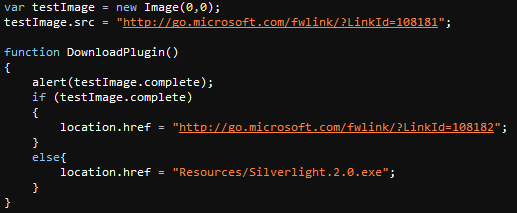
The JavaScript is also easy.  You will notice that the first two lines are not inside a function declaration, that means that they are executed as soon as the browser parses them during page load.  What those two lines are doing is attempting to load an image from the Microsoft.com download site.  Those of you with much web experience will notice that this is the technique we use to pre-load images for rollovers and similar effects.

The function then, which is called only if the user doesn't have Silverlight installed and clicks the "Install Silverlight" link, checks to see if the image was successfully downloaded or not.  If the image is present it means that the user does indeed have access to the Microsoft download site and directs the browser to the correct location and if not, directs them to the exe in the Intranet application.

JavaScript

Finally

As you can see this is a very simple way to make sure that users of Intranet hosted applications can still get the Silverlight plug-in, even if they don't have Internet access.  If anyone else has similar tips please pass them along.

kick it on DotNetKicks.com

Thursday, March 20, 2008

Silverlight 2: User Controls and Other Tips

Silverlight logo So I've started working in Silverlight and am completely blown away by it's power and ease of programming.  I'm not saying that there isn't a learning curve, there is with any new technology, but this one isn't too bad.  To be honest the hardest part of Silverlight 2 is finding information on it.  So with that said I'm going to pass on some of what I've learned over the last couple weeks.

First, the absolute best resource online currently is the forums over at Silverlight.net, there are people on there that really know their stuff and are happy to help out others.  You do need to register to use the forums but the same login/password you use at www.asp.net will work here as well.  I also recommend subscribing to the RSS feed of the latest blogs related to Silverlight, tons of good, knowledgeable people get cross-listed there.

So what am I working on?  First, this is what the project sponsors asked for:

rawbayface

As you can see it's boring.  No one cares about look in this application but still, we saw that and immediately thought of a nicer way of doing it.  So we convinced my manager to allow me to build a prototype screen for the feature using Silverlight 2.  He even gave the approval before the beta for Silverlight 2 was released.  So this is what I built: (Disclaimer:  If anyone is an NEC Unified Solutions customer the following screenshot is not in and may never be in a released product)

SilverBayface

Look a little nicer eh?  Basically it reads an XML document at runtime that it downloads from an ASP.NET application and then parses that data to create a series of controls.  The controls are one to four Stacks which can contain one or two Modules, each of which contain four Units.  The Stacks, Modules and Units are all specific to the application being built, which happens to be a piece of a PBX management application.  These are represented in the Silverlight application using custom User Controls defined for each piece.  The host application will have business objects that also relate to each of these Silverlight User Control classes.  Each of these user controls (Stack, Module and Unit) are added at runtime based on the downloaded XML document.  There are also more controls at a lower level and a couple of controls that are nothing but forms but for now lets concentrate on those three controls.

I'm not an expert by far, yet, but I have learned quite a bit about them and am very impressed.  In many ways User Controls in Silverlight are much more powerful than their ASP.NET counterparts.  You don't need to worry about state between actions for instance, this one piece took me a little while to figure out but once I did it is powerful indeed.  So here goes, some tips and pointers on Silverlight 2 User Controls.

First there are a couple of things you need to know for the code to make sense, LINQ and the way we're accessing global resources.

LINQ to XML

The normal XML namespace is not available in Silverlight so if you want to work with XML, you need to learn LINQ.  For me this was probably the hardest part of creating the prototype.  I've created and consumed many a XmlDocument in the past so moving to XDocument instead was a big step, it all looks foreign to me.  I struggled through it though and made it work, though I doubt someone that really knows LINQ to XML would think this code is "pretty".

You will be seeing LINQ to XML used in a few of the below samples but here is a taste:

rawlinq

In the above sample I am parsing the XML displayed below and returning a collection of slot elements.  It's different but makes a lot of sense one you get the hang of it.slotxml 

Accessing Global Resources

Another issue that needed addressed is that of accessing global resources.  This is one area where I had to go to the Silverlight.net forums for help.  I'm not sure if the answer I received and thus the approach that I took is the recommended approach, but it does work.  Basically the approach is to take create a singleton class that is loaded during initialization and then can be accessed ad modified from any level.

rawglobal

You will see this object used in some of the later code samples, at least now you will know what you are seeing.  It is all very simple, as is everything in Silverlight, once you figure out how to do it.

Now to the User Controls. 

User Controls are Real Objects

This is something that on the surface sounds like a no-brainer but when you really understand what it means is one of those things that changes the game.  For those of us coming from the web world pretty much all we have ever known is stateless programming.  All of our objects are one-time use and then you load it again if you need it again.  ASP.NET tried to mask this somewhat but the basic fact still remained.

With Silverlight 2 though any properties that you assigned values to still have those values when you next look at that object.  That sentence is a little hard to follow so let me try to explain. 

  1. Add custom properties to your new User Control when you create it.
  2. At runtime assign values to those properties.
  3. When responding to events at a later time those properties still have the value that was assigned.

The above doesn't sound that big but when you have multiple instances of the user control and each instance has unique values assigned to it's properties, the usefulness becomes much more apparent. 

To illustrate this here is a custom User Control I created for the prototype.  This is one of the simplest user controls but it illustrates the points.unitxaml

As you can see it has a very simple presentation, nothing but a square with some text on it, both of which call the same click event handler.  Now for the (truncated) code behind for that same control:rawunitcode

The class is derived from UserControl and defines a number of properties.  It also has a second constructor which initializes those same properties.  Nothing unusual here.  Here is an event handler accessing the properties declared above:rawunitevent

In this sample you can see that we are using the GlobalVariables singleton to obtain a reference to the root element of the XAML.  We then are using some of the values from the active instance of the Unit class to initialize an editable form, even passing in a reference to itself.

Programmatically Adding User Controls

For many dynamic applications you will not know at design-time the exact number of a given piece of your application.  This creates the need to add a given number of said element at run-time.  Enter Programmatically added user controls.

Adding a user control from code is quite simple and very similar to doing the same operation in ASP.NET.  You basically add the new user control to the children collection of some parent object.rawpage

After seeing how the controls are added, the code above of the event handler accessing the assigned properties should make a lot more sense.  You don't have to do any special coding to determine which object was clicked, as it is the actual object you created earlier.  This is a wonderful thing for all of us ASP.NET developers used to loading objects on each postback.

In a real world deployment there may be more logic happening here but this is all it takes to do this.  As you can see it is as simple as creating an instance of the control and then adding it to the parent.  One thing you may have noticed is the use of LINQ to XML, there is a reason for that that I will cover next.

Other Tips

  • Don't put a name on the root level control in your User Control or there can be only a single instance of it in the Silverlight application.
  • Learn LINQ.  I know I already mentioned this one but if you are going to be doing much Silverlight development it is a good thing to know.
  • Use Generic collections.  The Silverlight version of the CLR does not support the "old" collection types like ArrayList so get used to working with the new Generic collections like List<>.  Personally I prefer these anyway.

Final Thoughts:

So this was my first real taste of Silverlight development and all I can say is "WOW".  I already thought that this was going to be a game changer and now I am completely convinced.

This post has become a little longer than I had intended but I feel it is all good information for the ASP.NET developer getting started in Silverlight.  I will be posting more on Silverlight, and I'll also be giving some talks on it that will be announced in the near future.  This is an exciting time to be a web developer!

If you would like more information on this please comment on this post or ask me by another means.  I'll also be giving a presentation on April 22nd for the Cleveland C#/VB.NET Special Interest Group and again on May 17th at Cleveland Day of .NET with this same application as the base for the demos.

kick it on DotNetKicks.com

Monday, March 10, 2008

How Dinosaur Web Developers Can Regain Their Shine: Step 3

Rebrand Yourself

This one some people won't agree with but with new web technologies coming so fast and each having such potential, I think it's time to specialize.  I'm not advocating ignoring the other facets of our field, just picking one and knowing it inside and out, becoming an expert in a single field of study.

There are many options:

  • Web Standards (Don't just say CSS)
  • AJAX
  • Silverlight
  • Data Access (Linq, ADO, SQL 2008, etc.)
  • Web Services
  • ASP.NET MVC

That list is not even close to complete and is focused on MS technologies but you can get an example from it on how many different ways you can specialize.  I think we should all have a basic understanding of all of these technologies, but I also think we should find one technology that we really get into and specialize in it. 

Pick something that excites you.  Something that you can really get into so deeply that it rubs off on others.  Learn this technology so deeply that your peers regard you as a true expert in it.

I know this post is short and probably incoherent but better content will be coming soon.  Hopefully.

Thursday, March 6, 2008

No Excuse for JavaScript Errors!

I've refrained from posting rants to this blog up until now but I feel that this one is very relevant to the topics discussed here.  JavaScript errors on production web sites degrade the user experience for all users!  There is no excuse for them.  At best they degrade viewer's confidence in the site, at worst there is crucial functionality that doesn't work.

I know I'm not the first to rant about this, unfortunately I most likely won't be the last either.  With the proliferation of AJAX frameworks and JSON the number of script errors will undoubtedly increase instead of decrease.  Too many web developers either don't understand JavaScript or don't care enough to make sure that it works properly.

Personally, I think all web developers should always have script error notifications turned on in their browser, even when they are just surfing.  It really makes you see how prevalent they are and drive you to ensure that your own sites/applications don't have the same issues.

mixerror These errors aren't limited to small sites either.  Click a navigation link on the website for mix08 and you will find a JavaScript error!  Inexcusable.  This is even a site promoting a conference for web developers!  If on a Microsoft conference website there are errors, how can we expect Joe Developer to do better?

Monday, March 3, 2008

Web Accessibility: What does it mean?

In the first of this series on Web Accessibility I spoke briefly on why we should care about this important topic. Hopefully people don't need reasons but in case they do what I detailed should be a gentle push in the right direction.

For this installment I'm not going to get into what the standards are but try to give developers a way to better understand the implications of following the standards or not, and how some things that might actually be OK according to the standard do not necessarily make the site user friendly to all visitors.

What does it truly mean to make a website accessible? Learning the requirements and coding your site so that it passes the validators is definitely part of the process, but to truly make your site accessible requires more of an understanding of how the alternate methods of using sites actually work. You can go through the effort of using screen readers, magnifiers, speech recognition tools and the like but since most of us are used to using the mouse, keyboard and our eyes, we will never get a true feel for what it is actually like. I'm not saying don't try the tools on your own site / application, that is a very good idea, but there are a few other ways to learn as well.

Luckily, some users of these tools that also work in the web industry have recorded videos of them using their tools and talking about the user experience. If you do a quick search on YouTube you will find many such videos, some good, some not so good, but many at least give you a taste for what it is really like.

The best ones I've found come from Yahoo:

Personally I learned a lot from these two videos and I highly recommend watching them. It really changes the way you think about web accessibility by changing it from "Meeting the Standards" to "Making the Site Usable".

Tuesday, February 19, 2008

How Dinosaur Web Developers Can Regain Their Shine: Step 2

Get Involved.

That's it. Step two is just to get involved.

Ok, there's a little more to it than that, it takes a commitment to stay involved. But luckily, just being involved helps you to stay involved, more on that in a second.

In-Person Events

User groups (UG), special interest groups (SIG) and conferences large and small are wonderful ways to learn new information than you would normally get through your normal 8-5 job. The Cleveland area has a bunch of disconnected user groups that cover many areas of web (and other) technologies. The Greater Cleveland PC User Group (GCPCUG) is an umbrella organization of which many smaller, more focused groups are members. It is a good starting place to find what you are looking for. Not all groups are part of it though which can make finding them difficult at times.

A few groups to note are:

There are also events thrown by some of the large companies like Microsoft. Being a MS focused developer myself the events I'm most familiar with are events like Arcready, DevCares and MSDN Events but there are bound to be others for other technologies / companies. Some larger organizations also have their own internal groups that do the same things. I helped start an ASP.NET user group at the Cleveland Clinic and I know that Progressive has one as well, National City was starting an architect's book club when I was there last.

UPDATE: I forgot to mention a Google group set up to help find events: NEODevEvents

Online Tools

As much as social networking is a Web 2.0 buzzword (or should that be buzzphrase) it is truly a good way to meet and communicate with people of similar interests. Just like with Web Standards I can't say that I am great at this, or know everywhere to 'hang out' but I can say that just from the last couple of months I've already begun to know a wide range of developers, architects, managers and others in the field that have similar thoughts and ideas to my own. These people are at companies large and small are young and old, are experienced and beginners. What they all share though is a passion for what they do. And it's contagious. This is the part that helps keep you involved, everyone inspires/motivates each other. And you do it without trying.

My favorite at the moment is twitter. Everyone in the tech field it seems uses twitter, from all fields really but I only care about tech. When you first hear twitter described your (at least my) first thought is "what's the big deal?" and for the first week or two you still fail to see the allure. But then once you've found a group that's like yourself, then it all changes. Then when twitter is down (which unfortunately happens frequently) you will seem lost. One odd thing about twitter is that opposed to IM and similar things twitter does not seem to negatively affect productivity. It could be due to the asynchronous nature of it you don't need to reply right away, or even read things right away. Not only is the non-time sensitive nature of twitter capable it seems to be just the way things are done, it's very common to replay or receive a reply hours or even days after your message. One last thing about twitter that makes it unique is that you don't actually have to know someone to interact with them. You can follow nearly anyone you want to and see their messages. They don't see yours in normal conversation unless they are following you too but if you reply to them, they will see your post anyway. This lets unknown developers in Ohio respond and interact with 'big' names from around the world.

A few other relevant networking sites:

Collaboration & Networking

What I've talked about are of course not the only ways to get involved, it's just a starting point. Another good thing to do is to participate in an open source project at sourceforge or codeplex. There are also professional organizations like ACM or IEEE among others. If you have another way you like to be involved pass it along, I'd love to hear about it.

The best things about being involved locally and online are that you are constantly exposed to new technologies and people that are passionate about using them. Typically the more active members of these groups spend time experimenting and learning new technologies long before they are widely used and as such are great contacts for when you too are trying to learn those same things. Getting involved with other people passionate about technology is by far the best way to keep yourself motivated. Just be careful not to spend so much time that the WAF (or HAF I suppose) dips too low.

Disclaimer: Due to severe neck pain I'm currently taking a few meds that have um, dulled my senses so if this is less than legible that's why :)

Saturday, February 16, 2008

Web Accessibility: Why should we care?

Several things have had me thinking a lot about accessibility lately.  A number of things all happened at around the same time which brought this to the forefront of my thoughts.  A manager at work referred another developer to me on an accessibility question, I found that Bobby is offline and this neck problem I'm having has scared me with the possibility that I could be a disabled web user one day.

A Little Background

This is a topic that I actually know quite a bit about.  In previous jobs in earlier years I had to know quite a bit about accessibility, both in the rules and regulations and also in how to construct a site that followed those rules.  I frequently had to instruct others in following these rules and for a while every single site I built had to conform to these rules.  I haven't had to worry about accessibility much for the last few years so I was worried that things would have changed so much that I would be playing catch-up again.  Luckily (for me at least) the same standards that were around then are still current.  I'm not going to get into what the standards are and how to code in an accessible way in this post, I'll be doing a whole series on those topics.

Why Should We Care

I would guess that most readers of this blog are developers.  Not designers (I'm not that cool), not simple HTML writers, not information architects.  It should be obvious be obvious to people in those roles why they need to think about accessibility when working on a site.  For the advanced .NET developer though, who is often handed a design and a requirements document, why do we need to think about accessibility. 

First, We should ensure that the sites/applications we build are useable to the widest possible user base.  Wether you do this out of a sense of helping the community (generosity), possibly increasing market share (money) or to avoid possible lawsuits (fear) it is something that needs done.  Currently Section 508 of the ADA only is enforced on government, school and similar types of organization but I believe that will change.  Just as office buildings and retail stores have ramps and accessible bathrooms now, regardless of who they serve, the ADA will eventually be applied to all commercial websites.  It's only a matter of time.

Secondly, The anti-nmp(tm) reason.  Depending on the size and structure of an organization, frequently lines of responsibility are drawn in the sand as to who is in charge of what.  Often this creates an attitude where even if someone sees a deficiency, if it is not in their area of responsibility they ignore it (Not My Problem).  Accessibility should never be treated this way.  People who use alternate methods of accessing a web site or application don't do it out of choice, they do it because it is their only practical way of using the information / services that are readily available to the rest of the surfing public.  As developers we should have expert knowledge of what the standards are and how our programming choices will affect them, for good or bad.  I'm not going to attempt to create a change in the politics of offices around the globe, what I am preaching evangelizing though is that accessibility is too important to let it slip when you know how to fix it.  So I'm saying we should practice the opposite of not my problem (anti-nmp) for this important topic.

Third, What if it were someone you loved.  What if your spouse, parent or child was suddenly not able to see or have full use of their hands or some other disability that affected their use and enjoyment of the Internet?  What if it were you?  If you've ever had your broadband connection at home go out for a day or two how did it impact you?  I bet you realized you use the Internet much more frequently than you had thought.  Now imagine that half, or really the majority of those sites were difficult or impossible to use because of a physical limitation.  It would probably impact the way you live your life, not just the disability, but the lack of accessible Internet sites.

What to do

I'm going to be writing a ton of posts on this topic as it is something I care about quite a bit.  Newer technologies such as AJAX, Silverlight and Flex bring new challenges to making accessible web applications but it is not insurmountable.  In this series I will try to explain the rules and address how to apply them with current web technologies.  I know that I have work to do to clean up this blog to make it more accessible, I'm not saying that I'm perfect in doing this, I'm just saying that web accessibility is something that we all should learn about, care about and practice daily in our jobs.

Sunday, February 10, 2008

Old Code Part 3: Serious Hack Job

Screenshot of the Ways and Means committee website homepage For this edition of Old Code I bring up a project I worked on back in 2002 that was a serious hack job.  The code was not pretty, the architecture was not pretty, but it solved the issue and I believe it is still running cleanly today.  This was for another big client too, the Ways and Means Committee of the U.S. House of Representatives.

Background: In those days I was working for a company that had a bit of an identity crisis.  They did both political and government work, under different business names.  This particular project started similar to others I had built for other House Committees, Representatives and political candidates.  We had an in-house built content management system with SQL Server 2000 as the data store and classic ASP as the front end.  It wasn't the best system but it worked well for it's purposes.  As with clients in pretty much every industry, specifications didn't really exist.  My direction in building this app had been quite sparse "Build it like you did the Financial Services Committee with a couple extra sections."  So that's what I did.  This one was a bit more complex as they had a ton of old information they wanted to import and quite a few extra sections but our system handled it with a little customization and we were good.  Or so I thought.

Problem:  First, I've got to say that it is a little intimidating to be in a big wood-paneled conference room on Capital Hill with a bunch of committee staffers sitting across from you.  So the handoff meeting was progressing nicely and then the committee staffers start to say "what about this piece of functionality?"  True to form our owner, who had worked out the details with the committee, had agreed to things that 1) our software couldn't do and 2) he didn't tell me.  When the smoke cleared I've got a laundry list of new functionality to add to the site including two wonderful items:

  1. Integrate our CMS with the Library of Congress
  2. Integrate our CMS with the Government Printing Office

Apparently the committee staff had been told that our system could not only manage the content in their website but also could communicate with the LoC and GPO systems seamlessly.  Having never even spoken with anyone from either of those organizations, I knew this was going to be a ton of fun.  Oh yea, and I only had about 4 weeks to get this all done.

Issues: After speaking with the people from both of those organizations I learned that the GPO integration wanted an SGML file FTPd to them nightly with all of the committee activity.  Included in the schema was if it were the final version among other things.  This being 2002 I hadn't built a site that FTPd info to another site before but as you'll see in the solution below, I found (hacked) a way to make it work).  The LoC was a different issue completely, I don't remember it fully but I do remember that they would crawl our site, if told where to look, and look for specially formatted links.  Also, they needed links to their site to do an HTTP POST, not a GET like every other link on the entire interwebs.

Solution:  The GPO issue was solved by creating a DTS package on the SQL server that would run nightly.  This package was configured to pull the results, format them into SGML, save it off to a text file, and finally FTP it to a server at the GPO.  Writing about it now it sounds simple but pre.NET and for someone that had little experience with DTS packages, it was a little daunting.  But it worked, and I believe it is still working today (I left that company four years ago so I can't be completely sure).

For the LoC the solution was a little messier but easier.  If I recall correctly, most of what we had to do was to create specially formulated links over to their site.  By links I mean embedded forms where the link actually posted the form to their site.  I know there was more to it than that but that part was hackish enough to remember.  That is possibly why they are still using the same classic asp site that went live more than 5 years ago.  Although .NET gives you much cleaner ways to accomplish that.

Conclusion:  Why is it that the code we feel has the worst hacks sticks around the longest?  Apparently I did something ok since the site is still up after 5 years and a power shift in congress.  That part means something since frequently when power shifts from one party to the other (why do we only have two parties again?)  they redo everything the first part already had.  Frequently for no other reason than they can.  So either I made the site good enough or so complicated that they don't want / can't figure out how to replace it.

Thursday, January 31, 2008

Old Code Part 2: XML / XSLT Before it was Cool

For this issue of Old Code I'll be going way back. Before .NET, before Visual Studio, before broadband. I wrote this app before many of you were even working. This was probably my favorite project of all time, still stands up to that today. Since this was so long ago I can give more details than in the last issue so here we go.

Background: The year was 2000 and companies small and large were realizing they had to get online. Some because they had a business need to do so, others because "everyone else was'. This was a case of an actual business need.

I worked for a smallish web design / development company called DigitalDay, they had just changed their name from Mozes Cleveland and Company. We had some good sized clients like Sherwin Williams and Ernest & Young but our biggest (duh) was GE. We did a lot of work for GE Plastics and their Silicones division, incredibly huge multi-national companies. Anyway, one day I had just returned from TechEd 2000 in Orlando and was pulled into a conference call with a branch of GE Silicones in Europe. It was actually a joint venture between GE and Bayer (yes, the aspirin people). They had a problem.

Problem: When these two separate companies were merging their ERP systems it was concluded that they systems were incompatible so they switched both companies to SAP R/3. The E-Commerce team had been given a nearly impossible deadline of getting a system online using the new SAP system within just a few months. They did accomplish this goal (don't worry, we'll get to my role soon) as this was right after SAP had released the MySAP module which contained its own proprietary web server and exposed SAP modules online. Done, first goal accomplished. But there were issues.

Issues: While they met the milestone, no one was satisfied with the results. The web application wasn't branded GE Bayer Silicones but instead was branded MySAP including colors, logos and everything. Also, this was long before most manufacturing companies in Europe had broadband Internet and for them this application was incredibly slow. Customers complained. Then came the call.

So on this call they got us into the application to take a look around and wanted our opinion on if we could do anything to speed it up. It didn't take long before I had identified that the biggest issue affecting speed was the .js files being downloaded. They totaled around 300k. Even today in the AJAX and JSON world 300k .js files are a little excessive but in 2000 that was out of control. So the call ended and I went back to work only to be asked minutes later if I had a passport. Two weeks later I'm on a plane to Amsterdam to spend 10 days looking at the issue in Bergen Op Zoom Holland.

Once there I dug into the MySAP solution to see what I could do to fix it. So after three trips to Holland totaling over three months I had built them a solution that I am still proud of today.

Solution: The big requirement was to display a screen to the user with information on 300+ purchase orders in the quickest time possible. I crafted a solution where the page would have an embedded XML Data Island (linking XML was less reliable in those days) and linked XSL file, CSS file and JS file. The XSL/CSS/JS combination gave the ability to create HTML on the fly for two different layouts and allow sorting and filtering as well. All in client side code.

MySAP had already constrained them to using IE only, so I also had them use 5.0 or higher which gave me access to browser XML support and also having to only code the JavaScript once. I worked with ABAP programmers from Deloitte to get the information to me that I needed. I then had to learn SAP's server side language BHTML, which was simplistic but different, to craft the XML to send with the page. Due to the size constraints I went against "proper" XML design and used single character element names and no whitespace at all as every byte meant a lot when it would be repeated hundreds of times ((once in opening tag + once in closing tag) * number of results). Oh yea, and I built this entire app in Notepad. Not kidding. No IDE, not even Notepad Plus.

Conclusion: While using XML with client code in a browser may be common-place today, it was totally new at the time. XSL Transforms done in the client browser still isn't common, I did it in 2000. Basically between three months in Europe, totally cool technology and one of the best project managers I've ever worked under, this was my favorite project ever.

Lessons Learned:

  • Two-Day shipping from Amazon to The Netherlands cost more than the book itself
  • Never spend an anniversary in Amsterdam unless you can do it every year (I did, I haven't, I hear about it frequently)
  • Never take wife to Europe unless you can move there (I did, I haven't, I hear about it frequently)

Monday, January 28, 2008

Old Code Part 1: Plug-In(able) Web Application

Today I'm starting a series that I'm calling "Old Code".  This will be where I go over some project I've worked on that was notable for some reason but may not directly translate into a "how-to" for developers today.  These posts will more be about some problem to which there was no simple solution but to which a solution was found that was usually either particularly creative, cutting edge (for its time) or a total hack but that got the job done.  Some of these projects I'm proud of, others I'll be telling you about even if it may not be my best work.  Overall though I think we can all gain by looking back at our past projects and letting the public review them for with us.  In most of these I won't be able to provide code samples or even give application / company names because of NDAs but I don't think that will impact the overall posts.

I this first installment I'm going to be talking about a project I was working on about four years ago. Disclaimer: My memory of 2004 may be a little fuzzy but I don't think I can take full credit or blame for this solution.

Background: The overall project was to create a web-based management application for complex devices which did have their own internal memory.  Basically this application was to replace numerous desktop applications with a multi-user, accessible anywhere, cool, user-friendly, do everything management application.  When the project got started it was 2004 and we were building it in C# and ASP.NET on the .NET 1.1 framework.

Problem:  Of these devices that the application was to manage there are numerous 'families' to which the capabilities of and communication to are drastically different.  This application was to allow the ability to be installed with the ability to support one or more family and have the ability to support future families possibly being added by third-party developers.  They didn't want to release the source code or to have to recompile every time a new family was to be added.  In theory a third party company that makes these devices would have the ability to create their own "plug-in" and install it at a customer location without our companies involvement.

Issues: With it being 2004 none of us had a ton of .NET experience but we did know a lot.  To our knowledge (and I still think this was true in 1.1) all code-behind files for a web app were compiled into a single DLL at build time.  This is where the real issue existed:  How do we let third-party developers seamlessly add pages to our .NET 1.1 web application?

Solution: Now the architecture that was devised to handle this is hard to explain without examples.  Who am I kidding, it's hard to explain with examples.  Many good developers took months to really grasp what we were doing, we'll see if you get it quicker.  Basically the application was split into pieces.  It was already n-tier with a full business object model based on Lhotka's CSLA framework.  Basically an architecture was created in which any family specific code would exist in satellite dlls that are loaded using reflection at run-time based on information coming from the SQL Server database.  This included the code-behind files for any pages or user controls that contained family specific controls/data.  Much work was done to construct generic widget classes that only contain fields that all widgets have regardless of family and then having the family specific classes derive from those classes and add their own fields / methods as well as all update logic.  While that is standard for OO business layer development, it's something else to apply that same paradigm to web pages. 

We ended up creating a structure where the base application would know that there was a widgetconfig.aspx page.  Then at run-time an intermediary page would intercept the request for the config page and append a family specific folder name in front so that the request would get to the correct page.  These was still the issue of the code-behind pages.  This is where it gets tricky.  For each family specfic page the actual aspx would only contain the generic header and footer user control declarations (this was pre-master pages) and a declaration for a user-control of the same name as the parent page.  In the directive for the family specific user control the assembly would be named to find the class in.  This assembly was a family specific dll that housed all code-behind files for that families pages.  In the class for that user control it would name the actual .ascx file to associate with the controls defined in the class. 

Through this method we were able to create a way to add a new family to an installed server by adding some dlls to the bin and some code-less aspx & ascx files to the application folders.  So it was possible to do this without touching the original source.

Conclusion:  After much coding effort and even more in education this strategy went untested for nearly four years.  Just today we got word that the first true use of this plug-in model had been successfully implemented using our SDK and without touching our source code.  While I'm sure that there were probably more elegant ways to accomplish this and that I'm glossed over much of the complexity this was a solution for the problem that worked.  Of course in .NET 2.0 it would have been much easier, but that didn't exist yet.  I was going to have a co-worker from that project review this before I posted it but what the hey, he can review it by reading it :).

Don't worry,  some posts in this series may contain actual code :).

Thursday, January 24, 2008

How Dinosaur Web Developers Can Regain Their Shine: Step 1

Last week I posted that a large number of us that have been web developers since the first Internet boom are becoming dinosaurs.  I may have said COBOL programmers, but it's the same thing :). 

I also said that one of the things we need to learn in order to catch up is CSS.  Now, we all used to think we knew CSS, and we did they way it worked at the time, in the browsers of the day.  Through trial and error we learned what you could and couldn't do that would look consistent across the major browsers of the day.  Along the way we learned to stay away from things like dynamic positioning, you were pretty sure to have things look bad unless you wrote a TON of special code to account for browser differences.

Well, the browsers have matured along with us but while our hair may have thinned or waistlines grown the browsers have become more standards compliant.  Now the MS bashers will say that IE is still not compliant and sure, there are issues, but overall, wow, they all do a lot of cool stuff consistently now.  You might say that while we are moving steadily toward middle age, the browsers are finally just able to buy us a drink.  Positioning of elements, cool dynamic looks and even whole page layouts can now be done using nothing more than CSS and some images.  Better yet, it looks the same in all major browsers.

The longer we wait to learn the new standards, the harder it will be for us. 

mix Are you not convinced yet of what can be done with CSS?  Take a look at the site for MIX08 and then look at the exact same site with a different (and plain) stylesheet.  Pretty amazing huh? 


csszengarden Still not convinced?  Ok, check this one out: CSS Zen Garden is a site created to demonstrate the capabilities of standards based CSS design and provide the resources to help you do it.  Play around with the site by choosing different designs and you will see what I'm talking about.  There are samples of all of it along with links to plenty of other resources.


So, do you think you have what it takes to use standards based web development already?  If so then head over to the restyle site and enter the contest with your cool design.  You can get a trip to Vegas out of it and hear some guys named Ballmer, and Guthrie talk about cool stuff.

Monday, January 21, 2008

What is a RIA?

I'm going to spend a lot of time over the next few months talking about RIAs so why don't we get a definition out of the way now. I used the word RIA in my last post and received some feedback wondering exactly what it meant so here we go.

RIA stands for Rich Internet Application. At times you will also hear it defined as Rich Interactive Application, particularly by Microsoft, since most of the aspects can also apply to desktop apps and in some cases an online RIA can be ported to work on the desktop pretty much as-is (via XAML). Wikipedia has a pretty good overview which I highly recommend as a starting point in learning about them.

In short a RIA is basically a front end to an online application which is user friendly, graphically 'pretty', user friendly, responsive and user friendly. Did you catch on to a theme there? If not let me spell it out for you U S E R F R I E N D L Y. No amount of graphics or flashy interface will make an application user friendly without thought into how many ways the user will use the application, what they would logically expect it to do and then making those things happen.

In my opinion a true RIA isn't just fancy graphics and cool animated buttons, but an interface that is clean, intuitive, responsive and accomplishes it's goals without overloading the user with options and abilities that they don't want or need. I'm not saying I like Jacob Nielson's basic text layouts, far from it I'm just saying that adding animation or drag & drop or whatever just because you can instead of for a real usability concern just annoys users and makes the app less user friendly instead of more. Both animation and drag & drop and all the other niceties are very useful and are needed in some cases, just not all.

Here are a few other sites and articles with some RIA info:

This is only a sample of an information base that is growing daily. In future posts I'll talk about some of the technologies, methodologies and such as related to RIAs.

Friday, January 18, 2008

Web Development Is Dead! Long Live Web Development!

Everything is about to change.

Some would say it already has, I would argue that the changes that have taken place in our industry during the last 5-10 years are nothing compared to what's going to be happening over the coming few.

New technologies combined with better tools are making the kinds of things possible that we laughed at when sales people / clients suggested them a few years ago. Silverlight, Flex, AJAX, Web Services, Ruby are just a few of the technologies that are enabling this change. Tools like the Expression Blend / VS 2008 combination allow unprecedented cooperation between designers and developers. Now we CAN do what the designers want us to do, if they can draw it, we can build it.

The time of the RIA is fast approaching. The seventh principle of Web 2.0 as written by Tim O'Reilly in 2005 requires "Rich User Experiences". Regardless of what you think of Tim O'Reilly, Web 2.0 or 'cool' websites, it's happening now. Even the corporate world is noticing. I work for a major Japanese electronics company building a mundane management application and a couple months ago a senior executive mentioned Web 2.0 and mashups. This is not going to be a passing phase.

I know there have been some RIAs created today but they are far from mainstream. Nearly prediction list for 2008 by prominent web development bloggers name 2008 as the year of the RIA. I agree. I think it is time for 'classic' web developers to learn and embrace the new technologies or risk becoming outdated. Those of us who were writing cutting edge apps in the first big Internet boom (1998-2000) risk becoming the online equivalent of COBOL programmers unless we get off our butts and start learning again. While it's great that we know the intricacies of HTML, CSS, JavaScript and the .NET framework, now we need to learn XAML, JSON and some design skills.

Most importantly we need to learn how to think differently. All the rules we knew about what could and couldn't be done in a browser are being thrown out the window. Unless you want to be the one that is dismissed as 'stuck in the past' and be passed up but the young kids with all the cool ideas (exactly who we were ten years ago) we need to learn the new capabilities and learn them fast. Just think about it this way, how do YOU feel about COBOL programmers?

Web Development Is Dead! Long Live Web Development!